Check Register & Checkbook App

Meadowlark works like the paper checkbook register you know, with the math done for you. Every account gets its own register and a running balance on every line.

In short: Meadowlark is a digital checkbook register for checking, savings, cash, credit cards, loans and other assets. Each line has the date, check number, who you paid, category, note, amount and a running balance, and you can split, attach receipts, repeat bills and import bank files.

By the Meadowlark team at RockSolid Data Solutions · Last updated

What does the check register show?

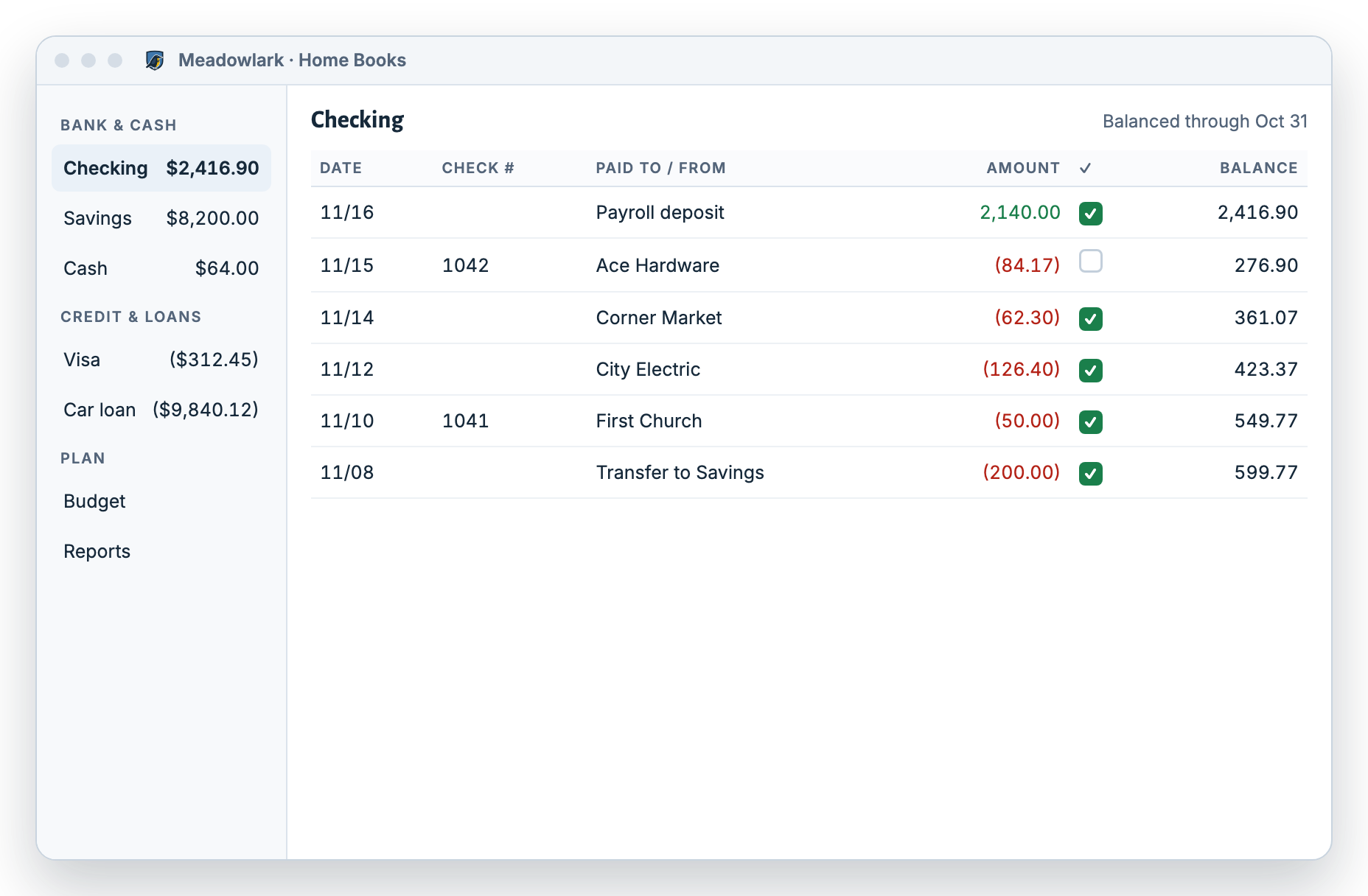
Each account has its own register. Lines are in date order, and the running balance updates the moment you add, change or delete one.

  • Checking, savings and cash
  • Credit cards, with card payments from checking
  • Loans, and assets like a house or car
  • Transfers between your own accounts
Meadowlark check register for a checking account: payroll deposit, Ace Hardware check 1042, groceries and utility bills, each with a running balance and a check mark when it appears on the bank statement
Example data. A checking account register with a running balance.

Register details

What columns are in the checkbook register?

The same columns as a paper register, plus a category so your budget and reports fill in on their own.

Search and filter any register by text, date range and category.
ColumnWhat it holds
DateWhen the money moved
Check #The check number, if you wrote or printed a check
Who you paidThe store, person or company, or who paid you
CategoryGroceries, utilities, paycheck and so on, or a split across several
NoteAnything you want to remember
AmountMoney in or money out
On statementA tick once it shows on your bank statement
BalanceThe running balance after this line

Everyday tools

What can I do with each transaction?

Split one purchase

A single store trip can be groceries, household items and a gift. Divide one transaction into several categories so your budget stays accurate.

Attach receipts

Attach images, PDF or DOC files to any transaction, up to 20 MB each. The receipt stays with the line it belongs to.

Move money between accounts

Record a transfer from checking to savings, or a credit card payment, once. Both registers update.

Record what your house or car is worth

Keep the current value of an asset up to date so your net worth report is right.

How do repeating payments work?

Save a bill, paycheck or transfer once, with a schedule. Each one can work in one of three ways.

  • Scheduled: it enters itself on the due date.
  • Reminder: it tells you it’s due, and you enter it.
  • Unscheduled: a saved template you use whenever you need it.

You can enter, skip, pause or resume any repeating payment, and see what’s overdue, so you stay on top of bills.

How do rules fill in categories?

Bank descriptions are often messy. Rules clean them up for you.

  • Match who you paid with Contains, Equals or Starts with.
  • Fill in the category on its own.
  • Rename a messy description, like “POS 4471 KROGER #322”, to just “Kroger”.
  • Rules also run when you import a bank file.

Loans

Can the register track a loan?

Yes. Give each loan its own account. Turn on smart loan and enter the rate, term, payment and start date.

Smart loan payments

When you record a payment, Meadowlark splits it into interest and principal from your loan terms. A live preview shows the new loan balance before you save, so you always know what you still owe.

Import

Can I import transactions from my bank?

Yes. Most banks let you download your transactions as a file. Meadowlark doesn’t connect to your bank, so you choose what comes in.

  1. Choose the account and file

    Pick the account, then a .csv, .ofx, .qfx or .ods file up to 2 MB.

  2. Map the columns

    For CSV, point to the date, who you paid, amount (one column or separate debit and credit columns) and note. Pick the date format.

  3. Preview and save

    See every row before it’s saved. Rules fill in categories as rows come in.

Coming from another app? See switching from Quicken or switching from Mint.

Who it’s for

Is a digital checkbook right for you?

Meadowlark is a great fit if you…

  • Keep a paper check register and want the math done for you
  • Write or print checks
  • Want a running balance you trust, on a Windows PC or the web

Another app may suit you better if you…

  • Want every purchase to download from your bank on its own
  • Mostly use your phone for money
  • Need investment tracking

Questions

Check register questions

What is a check register?

A check register is a running list of money in and out of an account, with the balance after each line. Meadowlark keeps one for every account you add.

How is the running balance worked out?

Meadowlark starts from the opening balance you enter, then adds money in and subtracts money out, line by line in date order.

Can I keep a register for a credit card?

Yes. Credit cards, savings, cash, loans and other assets each get their own register. Pay a card from checking and both registers update.

What receipt files can I attach?

Images, PDF and DOC files, up to 20 MB each.

Can I find an old transaction quickly?

Yes. Search and filter any register by text, date range and category.

Retire the paper register.

Try Meadowlark free for 30 days. No card needed. Windows desktop or web.