
Simple Bookkeeping for Small Business

For the small business you run, often alongside your household finances: a landscaping crew, a home bakery, a contracting job or a rental on the side.

In short: Meadowlark Small Business adds simple bookkeeping to the Meadowlark budget app. You get invoices in 4 designs, customer payments and statements, bills paid with printed checks, a profit report and balance sheet, and journal entries for your accountant. Keep your small business in its own profile, apart from your household.

Household and small business, kept apart

How do I keep my small business separate from my personal money?

Make a separate profile for each. A profile is one set of finances. Your household budget lives in one profile, and your small business lives in another, with its own accounts, customers and reports.

Small Business includes everything in Personal

  • Check register with a running balance for every account
  • Monthly budget by category
  • Balance your accounts to the penny
  • Import CSV, OFX, QFX and ODS files
  • Check printing and reports

You can switch between Personal and Small Business anytime without losing data.

What Small Business adds

What can I do with Meadowlark Small Business?

Invoices that look like you

Choose from 4 invoice designs: Modern, Classic, Bold and Airy. Add your logo, fonts, accent color and margins. Your company address appears on invoices and checks.

  • Statuses: draft, open, overdue, paid and void
  • Customer terms set the due date for you
  • Attachments and internal notes on each invoice
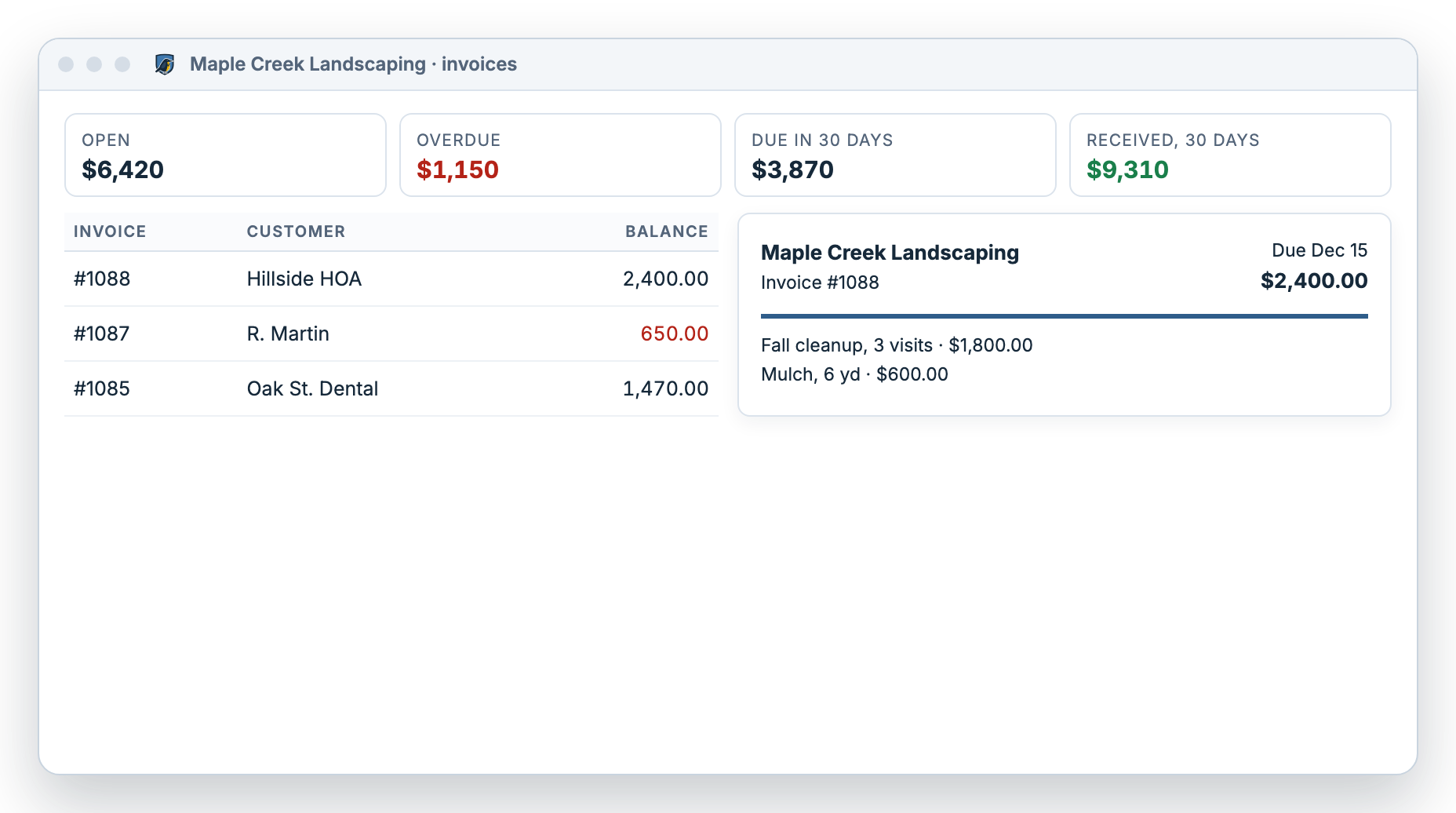
Meadowlark Small Business invoices for a landscaping company, with open, overdue and due-soon totals and a preview of one invoice

Get paid

Record payments by check, cash or ACH. Meadowlark applies each payment to the oldest invoices first, and you can change that. Send customer statements as PDF.

Pay bills with printed checks

Enter bills from vendors with categories and due dates, and see an aging view by vendor. Pay Bills combines a vendor’s bills into one check and prints checks 3 per page.

See how you’re doing

A dashboard shows net worth, assets, liabilities, balances, upcoming bills and repeating payments that are due. Run a profit report (accrual or cash basis) and a balance sheet.

Hand your accountant clean numbers

Journal entries and a full account list mean your accountant sees records they recognize at tax time.

Lock past periods

Once a month or year is done, lock it so nothing changes by accident. Add an optional password to the lock.

Customers, vendors and contacts

Keep everyone you bill and everyone you pay in one list, with their terms and addresses.

Example data. Screens shown are illustrations of the real app.

How do bills and Pay Bills work?

Bills in Meadowlark are cash-basis. Entering a bill keeps track of what you owe and when it’s due. Paying the bill records the expense.

  1. Enter the bill

    Add the vendor, the amount, a category and the due date. The aging view shows what’s due and what’s late by vendor.

  2. Pay Bills

    Pick the bills to pay. Meadowlark combines each vendor’s bills into one check from your checking account.

  3. Print the checks

    Print checks 3 per page, lined up once to your check paper, with your optional signature image.

Is Meadowlark right for my small business?

Meadowlark is simple bookkeeping for one owner. It is not full accounting software for a growing company, and we’d rather tell you now.

A great fit if you…

  • Run a small business yourself, often next to your household finances
  • Send invoices and get paid by check, cash or ACH
  • Pay vendors with printed checks
  • Want a profit report and balance sheet for your accountant
  • Use a Windows PC or a web browser

Not for you if you need…

  • Payroll for employees
  • Sales tax filing
  • Inventory tracking
  • Multiple users or team logins (each account has one owner)
  • Automatic bank syncing

Written by the Meadowlark team at RockSolid Data Solutions · Last updated

Small business questions

What is the simplest bookkeeping software for a small business?

The simplest choice is one that does only what you use. Meadowlark Small Business covers invoices, customer payments, bills, printed checks, a profit report and a balance sheet, without payroll, inventory or team features you may not need.

Can I use one account for my household and my small business?

Yes. Keep a separate profile for each. Small Business includes everything in Personal, so your household budget and your small business live in the same account but stay apart.

Will my accountant be able to use what I give them?

Meadowlark keeps journal entries and a full account list, and it runs a profit report on accrual or cash basis and a balance sheet. Ask your accountant which of these they want at tax time.

Does Meadowlark do payroll or sales tax?

No. Meadowlark has no payroll and no sales tax filing. If you have employees, use a separate payroll service and record the payroll payments in your Meadowlark register.

How much does Small Business cost?

See pricing. Small Business includes everything in Personal, and both plans start with a free 30-day trial with no card needed.

Run your small business on solid ground.

Try Small Business free for 30 days. No card needed. Windows desktop or web.