
Quicken Alternatives: A Simpler Way

If you like how Quicken keeps your checkbook but want something simpler, Meadowlark keeps the parts you use most and leaves out the rest.

In short: Meadowlark Finance is a simple Quicken replacement for people who mostly use the check register, check printing, a monthly budget and reports. It runs as a Windows desktop app that works offline or in any web browser. You bring your history over by exporting your transactions from Quicken and importing them as CSV, OFX or QFX.

Quicken replacement

Who switches from Quicken, and why?

Quicken Classic has been around for decades, and it does a lot. The people who look for a Quicken alternative usually aren’t unhappy with the idea. They want less of it.

Longtime checkbook keepers

People who have kept a register in Quicken for years, write checks, and balance against the statement each month. They want that to keep working, without features they never open.

People who want a calmer screen

Some find modern finance apps busy, with alerts and offers. Meadowlark has no ads and no credit card offers. It shows your accounts, your budget and your reports.

Households with a small business

People who run a small business next to their household and want invoices, bills and printed checks in the same app, in a separate profile.

What carries over from Quicken to Meadowlark?

The habits you built in Quicken work the same way here.

The check register

Every account gets a register with a running balance: checking, savings, cash, credit cards, loans and other assets. Columns are date, check #, who you paid, category, note, amount, an “on statement” tick and balance.

  • Split one transaction across several categories
  • Repeating payments that enter themselves or remind you
  • Rules that fill in the category and tidy up bank descriptions
  • Balance each account against your statement, to the penny
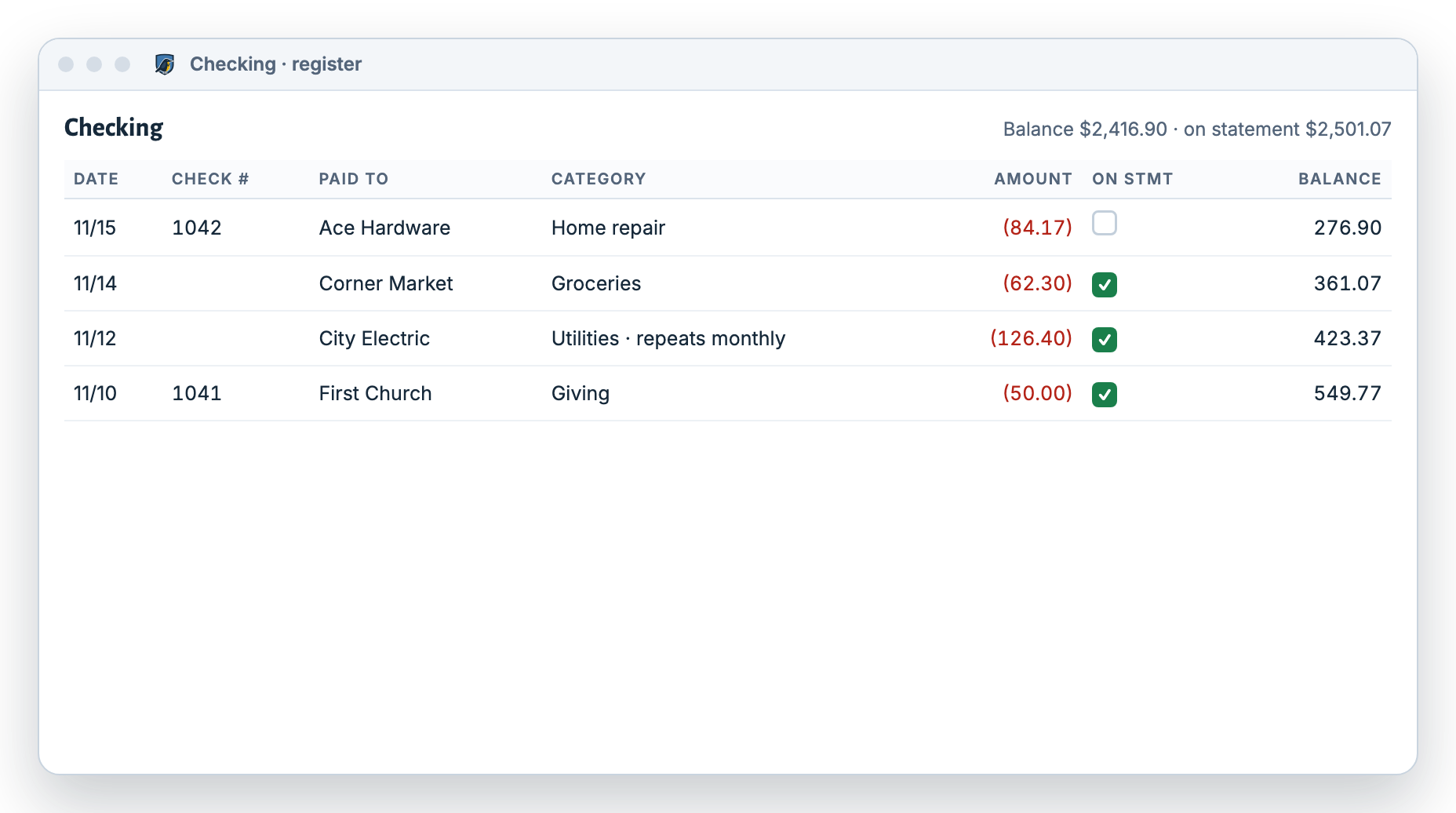
More about the check register
Meadowlark checking register laid out like a checkbook, with check numbers, who was paid, categories, amounts and a running balance

Check printing

Voucher, voucher with window envelope, and standard 3-per-page layouts. Line the fields up once on screen in 1/16-inch steps, then print one check or a batch.

Windows desktop

A Windows app that works offline, with automatic backups every 2 hours by default and up to 30 saved copies. Or use the web version from any browser, including on a Mac.

Budget

Set a monthly amount for each category, see what’s left, and copy the month forward. More about budgeting.

Reports

Spending by category with drill-down, cash flow by month, net worth compared with an earlier date, and a history of every change.

Loans

With “smart loan” on, each payment splits into interest and principal from the loan terms, with a live preview of the new balance.

Small business

The Small Business plan adds invoices, customer payments, bills with printed checks, a profit report and a balance sheet.

How do I move my data from Quicken?

You move your transactions one account at a time.

  1. Export from Quicken

    In Quicken, export each account’s transactions in a format your version supports, such as QFX/OFX or CSV. Your bank’s website can also give you QFX, OFX or CSV downloads.

  2. Create the account in Meadowlark

    Add the matching account in Meadowlark, such as “Joint Checking”, with its starting balance.

  3. Import and check

    Choose the account, then the file (.csv, .ofx, .qfx or .ods, up to 2 MB). For CSV, map the date, who you paid, amount and note, and pick the date format. Preview every row before you save.

Meadowlark’s importer accepts CSV, OFX, QFX and ODS files. It does not read Quicken’s own data file directly, so export your transactions first. If a file is larger than 2 MB, export a shorter date range and import it in parts.

How does Meadowlark compare with Quicken Classic and Quicken Simplifi?

All three are good at different things. Here’s a fair look at where each one fits.

Based on each company’s website, checked November 2026. Features change; check before you choose. For Meadowlark’s price, see pricing.
What you wantMeadowlarkQuicken ClassicQuicken Simplifi
Check register with a running balanceYes, for every accountYesTransaction list
Print checksYes, voucher and 3-per-pageYesNo
Desktop app that works offlineYes, WindowsYes, Windows and MacNo, web and phone
Use it in a web browserYesLimited companion accessYes
Monthly budget by categoryYesYesYes, as a spending plan
Transactions download from your bank automaticallyNo. You enter or import them.YesYes
Investment trackingNoYesYes
Dedicated phone appNoCompanion appYes
Invoices and bills for a small businessYes, with Small BusinessYes, in a combined small business and personal editionNot its focus

Meadowlark is a great fit if you…

  • Mostly use Quicken’s register, budget and check printing
  • Want a simpler screen with fewer features to learn
  • Use a Windows PC, or are happy with a web app
  • Like entering transactions yourself or importing a file
  • Run a small business next to your household

Another app may suit you better if you…

  • Track investments, retirement accounts or stock prices
  • Want every transaction downloaded from your bank automatically
  • Want a desktop app on a Mac
  • Manage money mostly from a phone
  • Need payroll or multiple users

Written by the Meadowlark team at RockSolid Data Solutions · Last updated

Questions from Quicken users

What is the best alternative to Quicken?

It depends on what you use Quicken for. If you mostly keep a check register, print checks, budget and run reports, Meadowlark is a simpler choice. If you track investments or want automatic bank downloads, Quicken Simplifi or another bank-linked app may suit you better.

Can I import my Quicken data into Meadowlark?

Yes, your transactions. Export them from Quicken as QFX/OFX or CSV, whichever your version supports, then import the file into the matching Meadowlark account. You preview every row before it’s saved.

Does Meadowlark print checks like Quicken?

Yes. It prints voucher, voucher with window envelope, and standard 3-per-page checks. You line up the fields once and can add a signature image.

Is there a Windows desktop version?

Yes. The Windows app works offline and backs up automatically. There’s also a web version. The two are separate and don’t sync.

Does Meadowlark track investments?

No. Meadowlark covers checking, savings, cash, credit cards, loans and asset values like a house or car, but not investment accounts.

Keep your checkbook. Lose the clutter.

Try Meadowlark free for 30 days. No card needed. Windows desktop or web.