Budget app & check register · Windows and web

Know where your money goes.

Meadowlark is a simple budget app and check register for you and your household. Track every check, bill and purchase, plan your monthly budget, and balance your accounts to the penny.

Free for 30 days. No card needed.

  • Running balance on every account
  • Monthly budget by category
  • Built by RockSolid Data Solutions
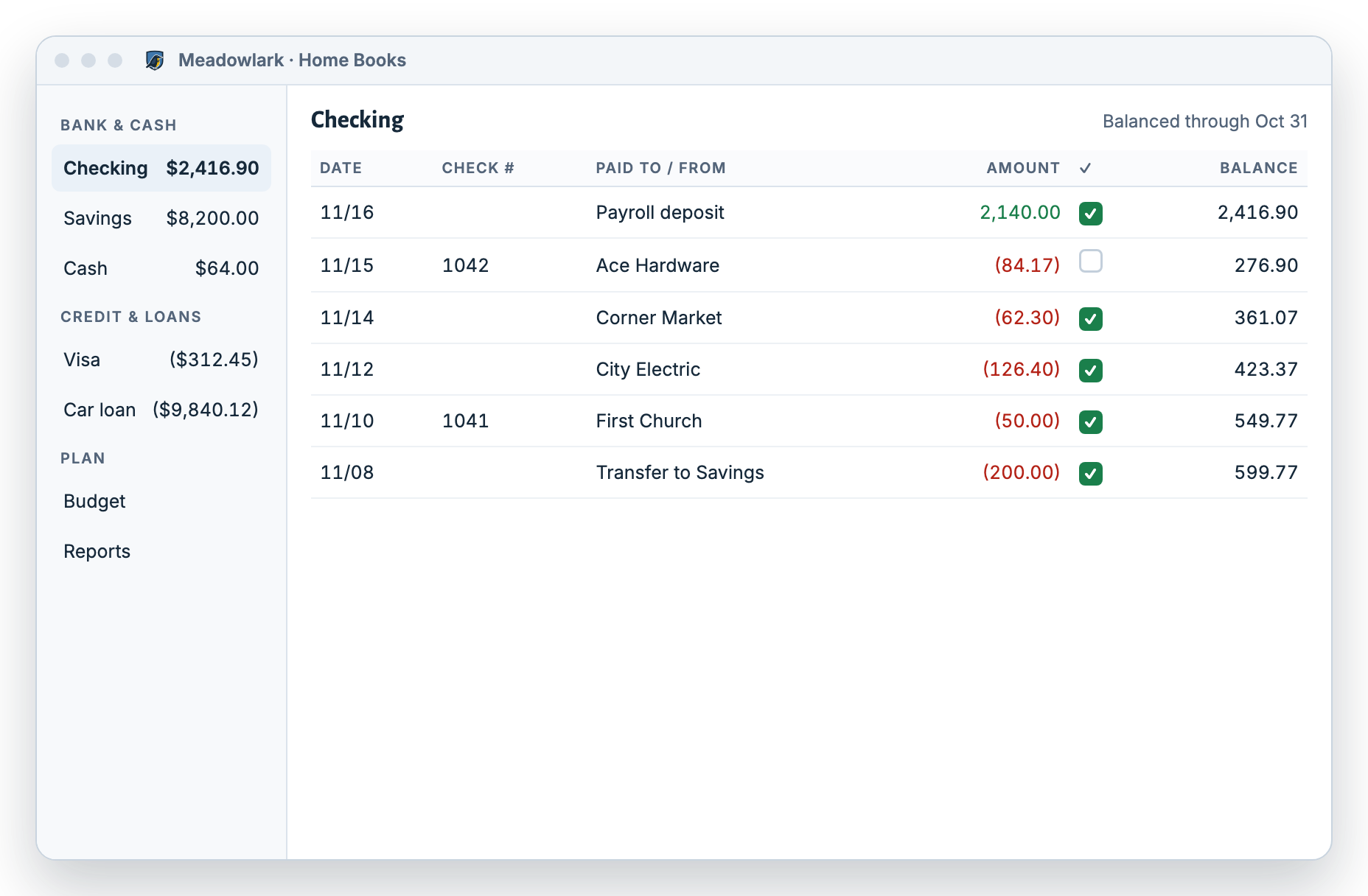
Meadowlark check register for a checking account: payroll deposit, Ace Hardware check 1042, groceries and utility bills, each with a running balance and a check mark when it appears on the bank statement
Every account in one placeChecking, savings, credit cards, cash and loans, each with a running balance.
A budget that fits real lifePlan each month by category and see what’s left to spend.
Balance to the pennyMatch each account to your bank statement in minutes.
Windows desktop & webUse it on your PC, even offline, or from any browser.

What is Meadowlark Finance?

Meadowlark Finance is a personal budgeting app and check register for Windows and the web. It keeps a running balance on every account, plans a monthly budget by category, balances your accounts against your bank statement, prints checks, and adds simple invoicing and bills for people who also run a small business. It is made by RockSolid Data Solutions.

Best for
Households who keep a checkbook register, people leaving Quicken or Mint, and anyone who wants a budget and a register in one place
Runs on
Windows desktop app (works offline) and any web browser
Main tools
Check register, monthly budget, account balancing, bill reminders, loans, reports, check printing
Getting data in
Type transactions in, set up repeating bills, or import CSV, OFX, QFX or ODS files from your bank
Plans
Personal, and Small Business (adds invoices, customer payments and bills). See pricing.
Free trial
30 days, no card needed
Made by
RockSolid Data Solutions, a US software company

Written by the Meadowlark team at RockSolid Data Solutions · Last updated

Personal finance, made simple

Stay on top of every bill and every dollar

Meadowlark works like the checkbook you already know, with the math done for you.

See where you stand

Every account shows a running balance, so you always know what you have, what’s coming out, and what’s left.

Plan the month

Set a budget for each category, see what’s left as you spend, and copy it forward to next month in one click.

Balance to the penny

Tick off what’s on your bank statement and Meadowlark shows any difference. Catch double charges and mistakes before they cost you.

Features

Everything your checkbook does, and a lot it can’t

Meadowlark has five main tools: a check register, a monthly budget, account balancing, reports, and small business tools for people who also run one.

Check register

Every account in one place: checking, savings, cash, credit cards and loans, with a running balance on every line.

  • Rules fill in the category for payees you use often
  • Repeating bills enter themselves on schedule
  • Transfers, card payments and loan payments
More about the check register
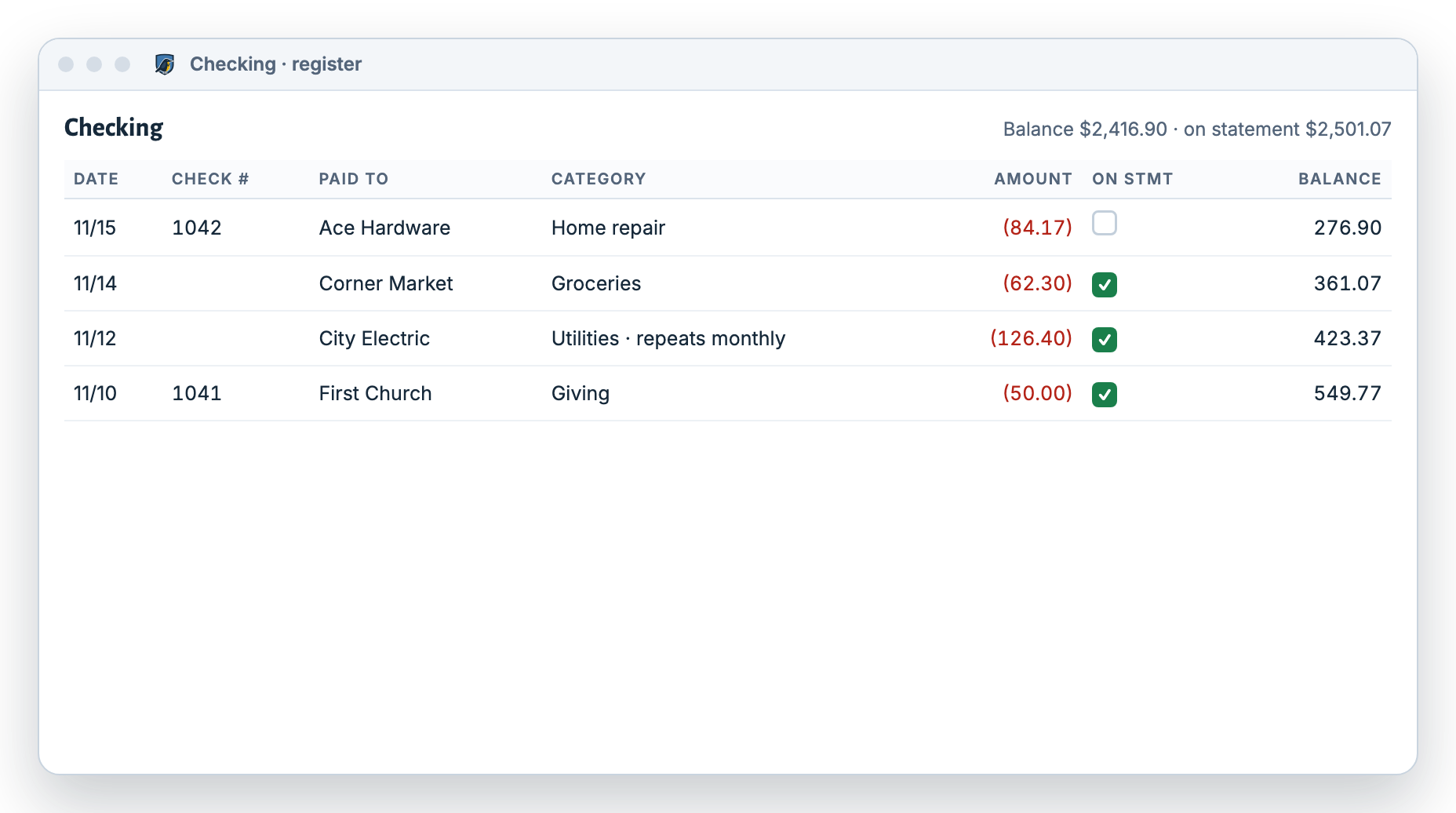
Meadowlark checking register with check numbers, payees, categories, amounts and a running balance

Monthly budget

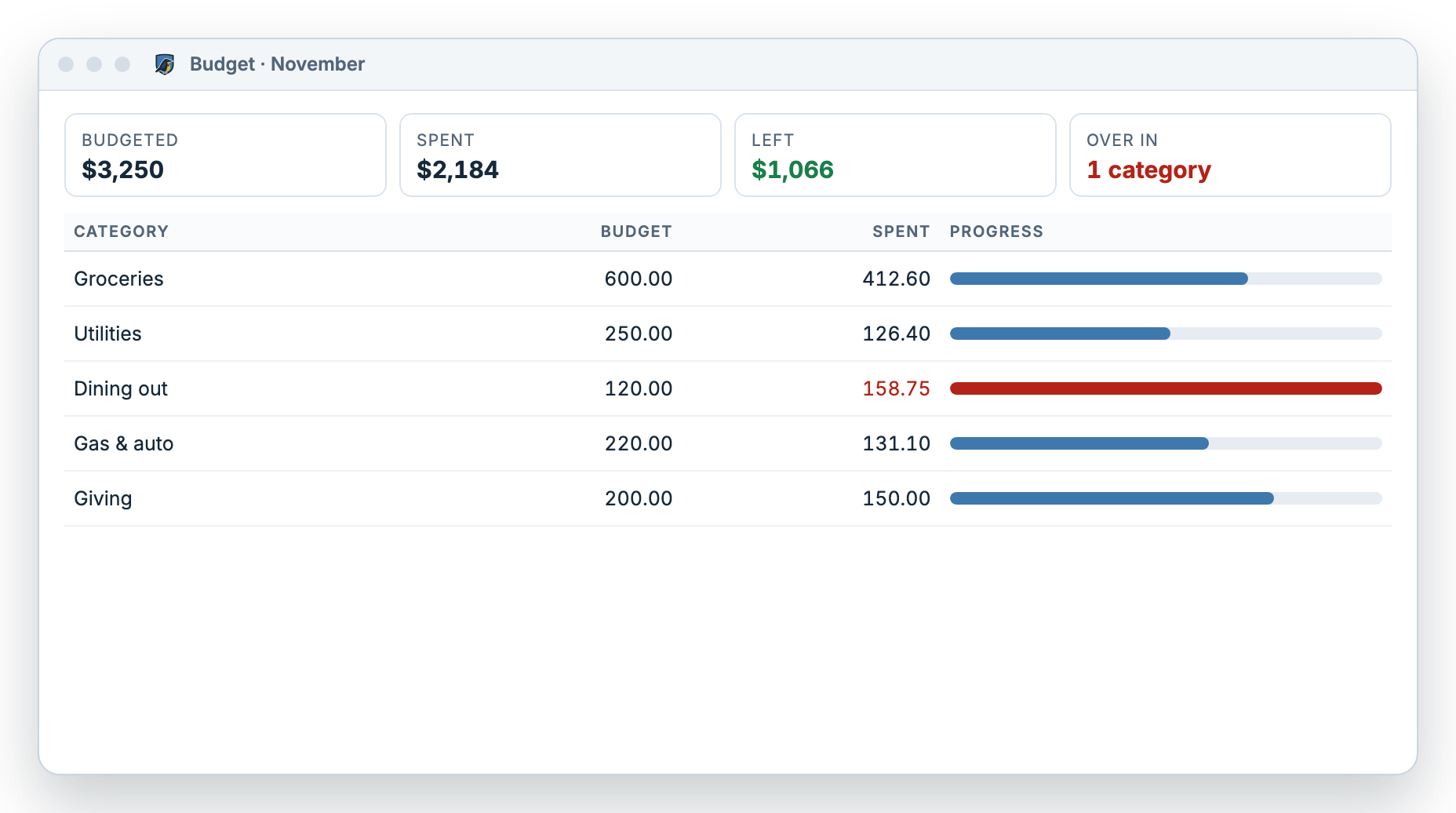
Budget by category, watch spending fill in as you go, and carry your plan forward each month.

  • See what’s left in every category
  • Over budget shows plainly, without scolding
  • Copy last month forward in one click
More about budgeting
Meadowlark November budget: groceries, utilities, dining out, gas and giving, each with budgeted and spent amounts and a progress bar

Balance your accounts

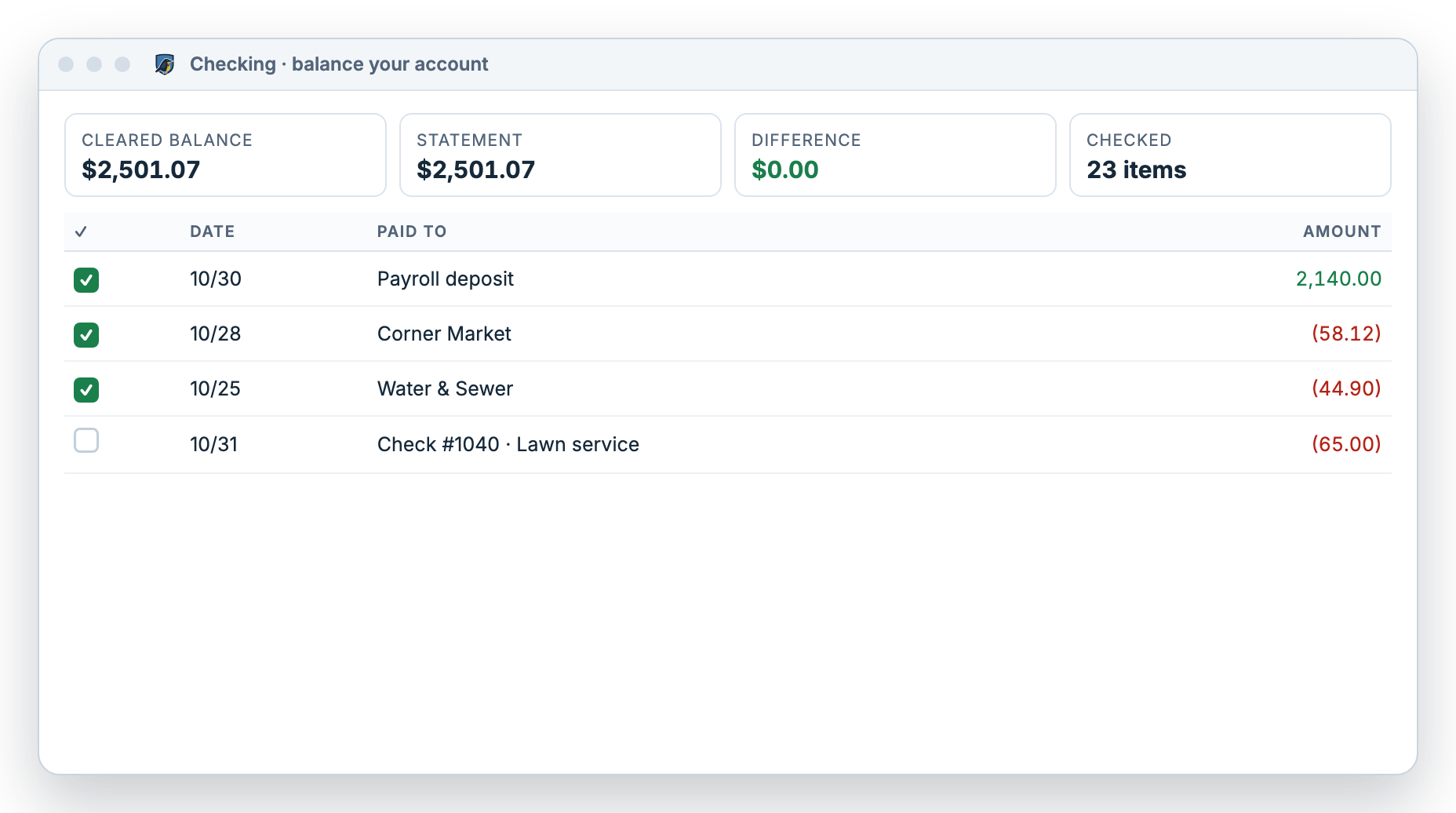
Match any account to your bank statement, to the penny. Meadowlark keeps a history of every month you balance.

  • Tick off what’s on your statement
  • See the difference shrink to $0.00
  • Every balanced month is saved
How balancing works
Balancing a checking account in Meadowlark: cleared balance equals the statement balance, difference $0.00

Reports

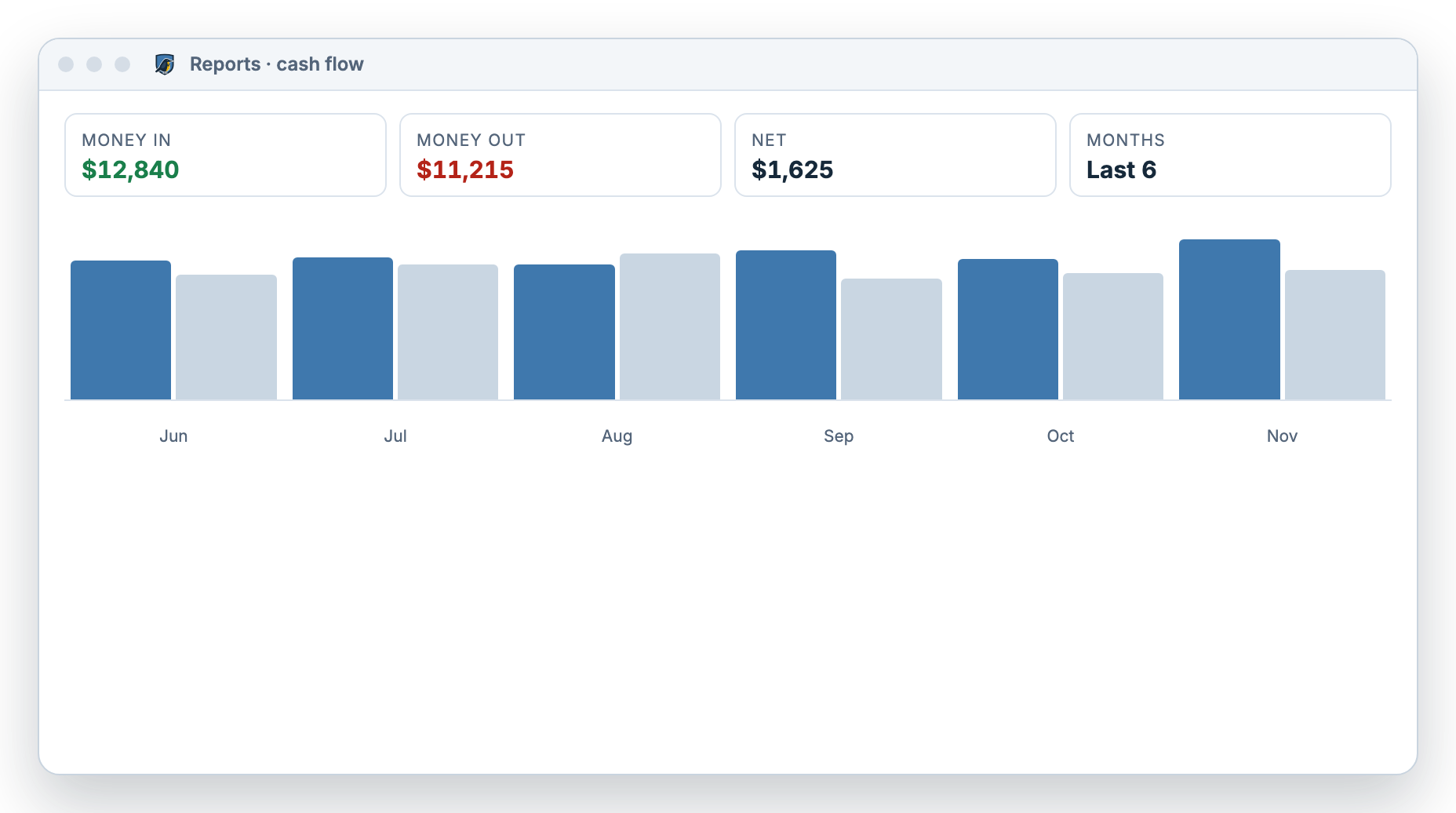
See your spending by category, money in and out by month, and your net worth.

  • Spending by category
  • Cash flow by month
  • Net worth: what you own minus what you owe
More about tracking spending
Meadowlark cash flow report showing money in and money out for the last six months

Small business tools Small Business

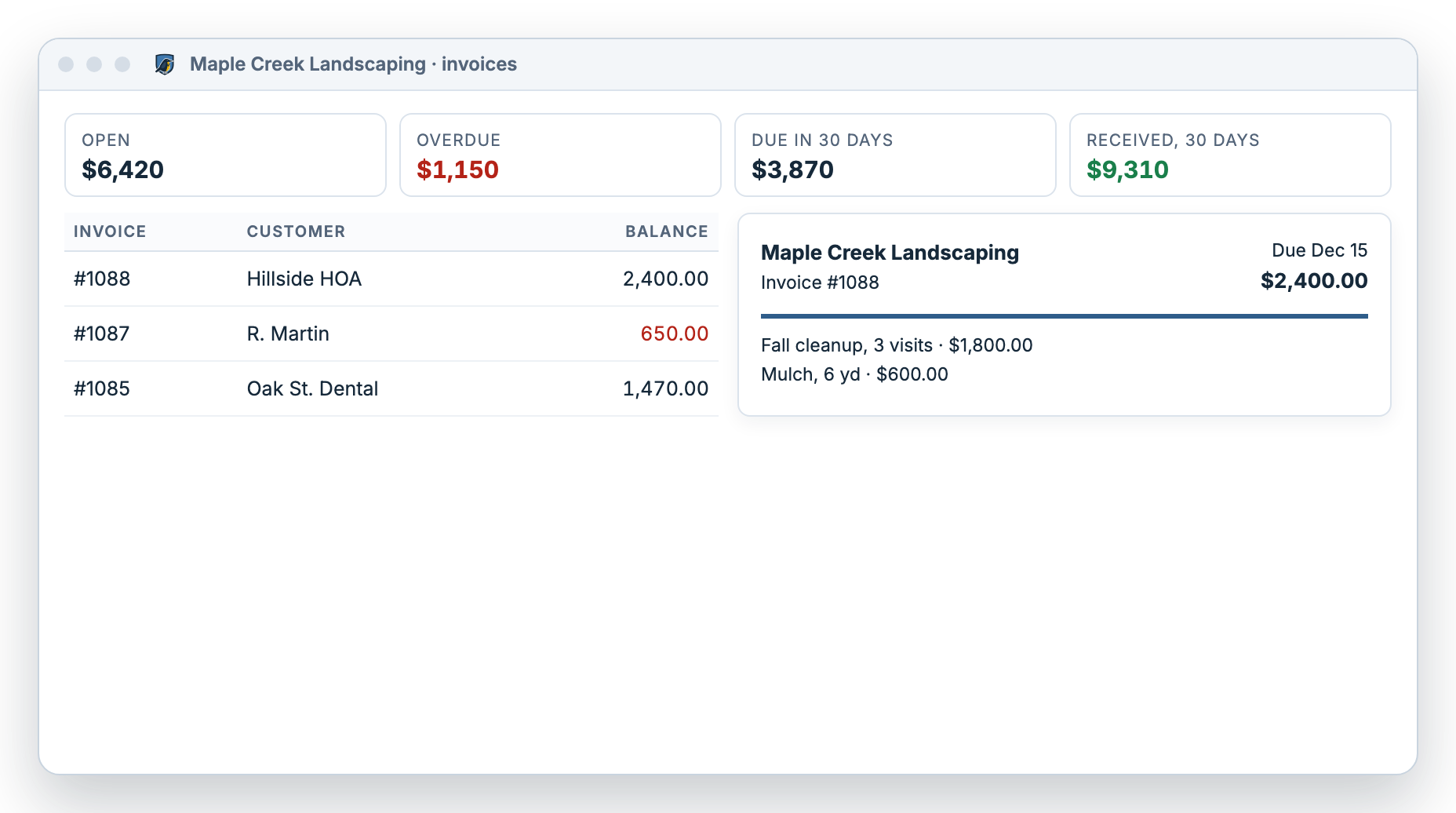
Run a small business on the side? Send invoices with your logo, record customer payments, and pay bills with printed checks.

  • Invoices with your logo, in 4 designs
  • Customer payments and statements
  • Pay bills and print the checks
More about Small Business
Meadowlark invoices for a landscaping business: open, overdue and due-soon totals with an invoice preview

Example data. Screens shown are illustrations of the real app.

Personal or Small Business

Made for your household. Ready for your small business.

Meadowlark is built for personal finance first. If you also run a small business, switch to Small Business to add invoices and bills. Your data comes with you.

Personal

For you and your household: everyday spending, bills, savings and loans.

  • Check register for every account
  • Monthly budget by category
  • Balance your accounts to the penny
  • Bill reminders and repeating payments
  • Loans with interest and principal split out
  • Import your bank’s download files
  • Print checks
  • Spending, cash flow and net worth reports

EVERYTHING IN PERSONAL, PLUS

Small Business

For the small business you run, like a landscaping crew, a home bakery or a contracting job.

  • Dashboard with balances and what’s due
  • Invoices with your logo, in 4 designs
  • Receive payments and send customer statements
  • Bills and vendors, paid with printed checks
  • Profit report and balance sheet
  • Simple bookkeeping your accountant will recognize
  • Lock past months with a password
See Small Business

Is Meadowlark right for you?

How Meadowlark compares with other budgeting apps

Most popular budgeting apps are built around linking your bank. Meadowlark is built around the check register you keep yourself. Here’s an honest look at where each fits.

Based on each company’s website, checked November 2026. Features change; check before you choose.
What you wantMeadowlarkApps built on bank linking (YNAB, Monarch, Simplifi)
Keep a check register with a running balanceYes, for every accountTransaction lists; register style varies
Print checksYes, voucher and 3-per-pageGenerally not offered
Windows desktop app that works offlineYesWeb and phone apps
Monthly budget by categoryYesYes
Balance accounts against your statementYes, with saved historyVaries by app
Transactions download from your bank automaticallyNo. You enter or import them.Yes, that’s their core feature
Dedicated phone appNoYes
Invoices and bills for a small businessYes, with Small BusinessMostly not

Meadowlark is a great fit if you…

  • Keep a checkbook register today, on paper or in Quicken
  • Write or print checks
  • Use a Windows PC and want an app that works offline
  • Like knowing every transaction because you entered it
  • Run a small business on the side and want one tool for both

Another app may suit you better if you…

  • Want every transaction pulled from your bank automatically
  • Mostly manage money from a phone app
  • Want investment tracking and retirement planning
  • Need payroll or full accounting for a growing company
65%of Baby Boomers still write personal checks.FinanceBuzz, financial literacy by generation
85%of Americans say they budget, and most say it helps them get or stay out of debt.Debt.com budgeting survey, 2026
30×more people search for “balance a checkbook” than “checkbook reconciliation”. We use plain words.Google Ads search data via seodata.dev, 2026

How it works

Up and running in an afternoon

  1. Add your accounts

    Checking, savings, credit cards and loans, each with today’s balance.

  2. Track as you go

    Type in checks and purchases as they happen, set up repeating bills, or import your bank’s download file. Meadowlark sorts them into categories for you.

  3. Budget and balance

    Plan your month, watch your budget fill in, and balance your accounts when the statement comes. That’s it.

Built to last

A money tool you can count on for years

Meadowlark is made by RockSolid Data Solutions, a software company that builds systems for small businesses for a living. It’s steady, simple, and here to stay.

Works offline on Windows

Install it on your PC and use it anywhere, with automatic backups to a folder you choose. Or use the web version from any browser.

Your data stays yours

No ads and no credit card offers. Meadowlark doesn’t connect to your bank, so nothing changes in your register without you. How we protect your information.

Real people for support

Questions go to the team that builds it. Plain answers, no scripts. Contact support.

Coming from Quicken or Mint?

Bring your history with you

Download your transactions from your bank or your old app and import them. Meadowlark lines up the columns and sorts each purchase into the right category.

Switching from Quicken · Switching from Mint

Import formats

CSV, OFX, QFX and ODS files, up to 2 MB each. Preview every row before it’s saved, and your rules sort each purchase into a category as it comes in.

Who makes Meadowlark

Meadowlark Finance logo
“We build software that small businesses run on every day. Meadowlark is the simple, private money tool we wanted for our own families.”

The team at RockSolid Data Solutions, makers of Meadowlark Finance. About us

Questions

Good questions, plain answers

Is Meadowlark a budget app or a check register?

Both. Meadowlark keeps a check register for every account, with a running balance, and a monthly budget by category. You see what you have and what you planned in one place.

Do I have to type in every transaction?

You can, and many people like that it keeps them aware of every dollar. You can also set up repeating bills that enter themselves, or import the file your bank lets you download (CSV, OFX or QFX). Meadowlark doesn’t connect to your bank.

Can I import from Quicken, Mint or a spreadsheet?

Yes. Export your transactions as CSV, OFX or QFX and import them into any account. You’ll see every row before it’s saved.

Can I print checks?

Yes. Meadowlark prints voucher and 3-per-page checks, and you line the fields up with your check paper once.

Does it run on Mac?

The desktop app is for Windows. On a Mac, Chromebook or any other computer, use the web version in your browser.

Where is my information stored?

With the Windows app, it’s stored on your own PC, with automatic backups to a folder you choose. With the web version, it’s stored securely on our servers so you can reach it from any browser. The desktop and web versions are separate and don’t sync.

What’s the difference between Personal and Small Business?

Personal covers your accounts, budget, balancing and reports. Small Business adds invoices, customer payments, bills, vendors and small business reports. You can switch anytime without losing anything.

What happens when the free trial ends?

You choose a plan to keep going. If you don’t, you’re not charged, and you can still export your information.

Who makes Meadowlark?

RockSolid Data Solutions, a US software company that builds software for small businesses. Meadowlark is our own product, supported by our own team.

Your money, on solid ground.

Try Meadowlark free for 30 days. No card needed. Windows desktop or web.