
Balance Your Checkbook to the Penny

When your bank statement comes, Meadowlark helps you check it against your register line by line. You see the difference shrink as you go, and you know right away if something is off.

In short: To balance a checkbook in Meadowlark, enter your statement date and ending balance, then tick each item that appears on the statement. Meadowlark shows the cleared balance, the statement balance and the difference, and you finish when the difference is $0.00.

By the Meadowlark team at RockSolid Data Solutions · Last updated

Why balance

Why should I balance my checkbook?

Balancing your accounts each month is the surest way to know your balance is right. It also catches mistakes, by you or by the bank, while they are still easy to fix.

  • Spot a charge you don’t recognize
  • Catch a double charge or a wrong amount
  • Find a deposit that never showed up
  • Notice a check that hasn’t cleared yet
  • Trust the running balance before you write the next check

In 2012, 46% of Americans used a check register to balance their account (NEFE poll, 2012).

Step by step

How does balancing work in Meadowlark?

Have your paper or PDF bank statement in front of you. Most months take a few minutes.

  1. Start with your statement

    Open the account and start balancing. Enter the statement date and the ending balance printed on the statement.

  2. Tick what’s on the statement

    Go down the statement and tick each deposit, check and charge that appears on it.

  3. Watch the difference

    Meadowlark shows the cleared balance, the statement balance and the difference between them. Each tick moves the difference.

  4. Find anything missing

    If something is on the statement but not in your register, add it right there. If an amount is wrong, fix it.

  5. Finish at $0.00

    When the difference is $0.00, finish. Your account is balanced to the penny.

  6. Come back anytime

    Interrupted? Leave and resume the session later, right where you stopped.

What does the balancing screen look like?

Three numbers sit at the top: your cleared balance, the statement balance, and the difference. Below them are the account’s transactions, so you can match them to your statement one by one.

The register also has an “on statement” column, so you can always see which lines have cleared.
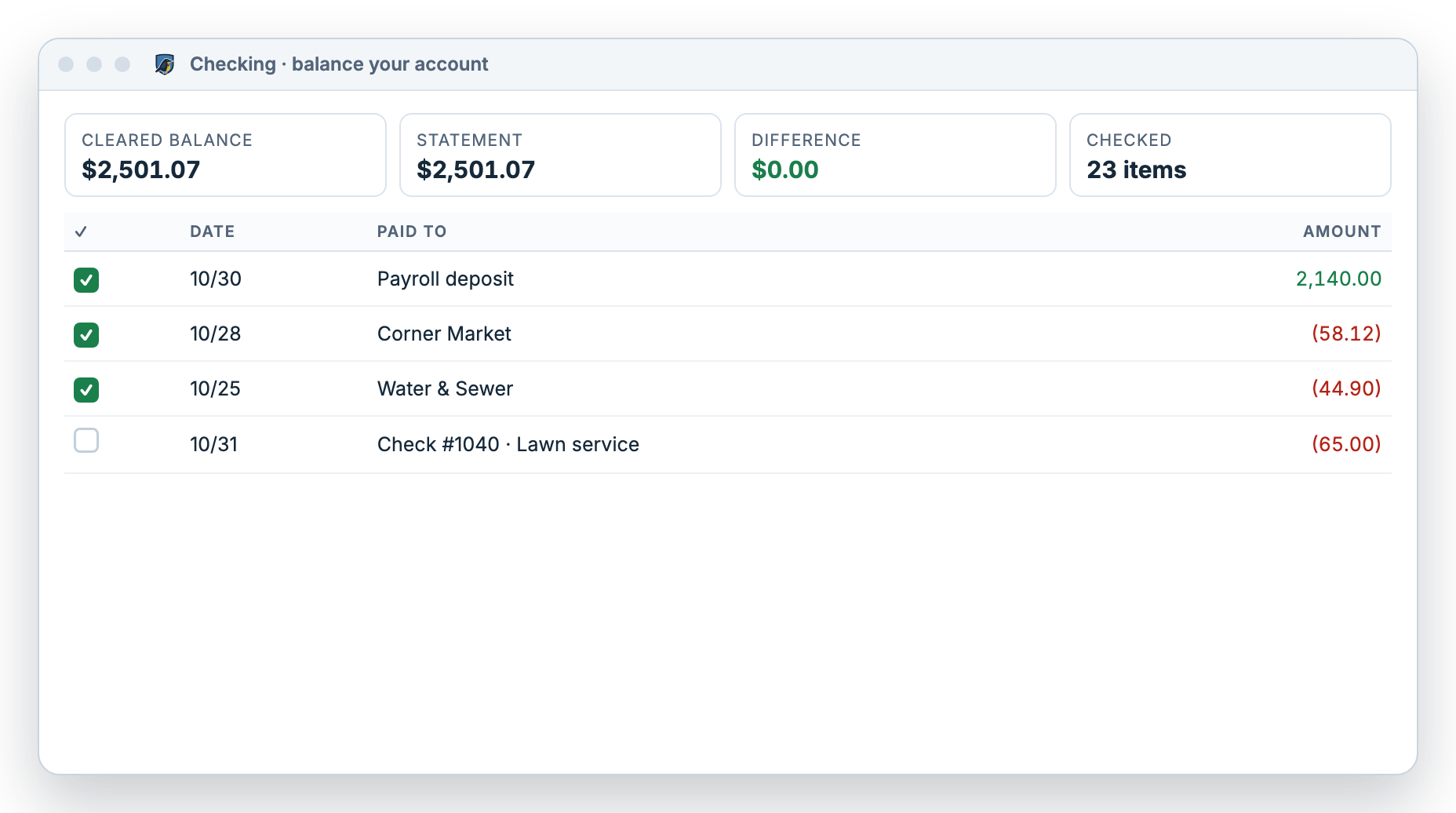
Balancing a checking account in Meadowlark: statement ending balance entered, items ticked, cleared balance equal to the statement balance and a difference of $0.00
Example data. A checking account balanced to the penny.

History

Does Meadowlark keep a record of past balancing?

Yes. Every balancing session is saved to the account’s history with its status, so you can look back at any month.

Four plain statuses

Each session in the history is marked open, closed, superseded or abandoned. An open session is one you can resume.

Proof for later

Months from now, you can see when each statement was balanced. That helps if a question comes up with your bank or at tax time.

When it doesn’t match

What if my checkbook doesn’t balance?

A difference that won’t go away usually has a simple cause. Try these checks in order.

Look for the exact amount

Search the register for the difference itself. It is often one missed charge, fee or deposit.

Check for swapped digits

If the difference divides evenly by 9, two digits may be swapped, like 54 typed as 45.

Check for doubles

Half the difference may be an item entered twice, or one entered as money in instead of money out.

Still stuck? If the bank made the error, such as a double charge or a missing deposit, call your bank with the statement and your register open. Our step-by-step guide on how to balance a checkbook covers more fixes.

Questions

Balancing questions

How often should I balance my checkbook?

Once a month, when your statement arrives, is a good habit. You can balance any account in Meadowlark whenever you have a statement.

Can I balance savings and credit card accounts too?

Yes. You can balance any account in Meadowlark against that account’s own statement, the same way you balance checking.

What if I can’t finish in one sitting?

Leave and come back. Your session stays open and you can resume it where you left off.

Do I need a paper statement?

No. A PDF statement from your bank’s website works just as well. You only need the ending balance and the list of items.

Does balancing change my budget?

Only if you add or fix transactions while balancing. Those changes flow into your budget and reports, which keeps them accurate.

Know your balance is right.

Try Meadowlark free for 30 days. No card needed. Windows desktop or web.